



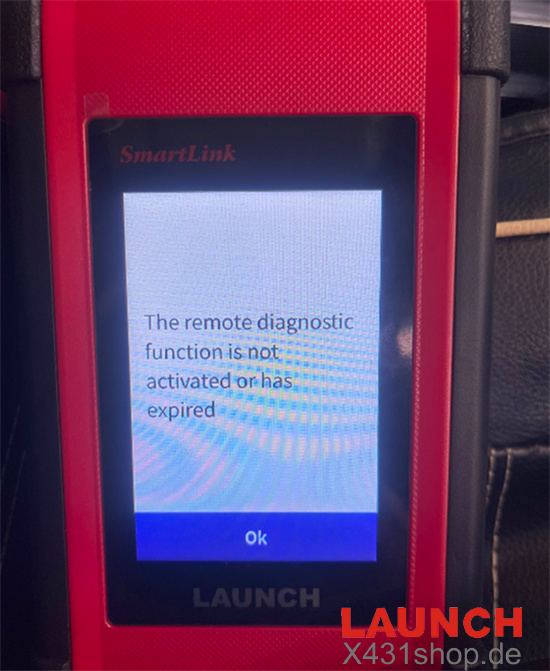
When connecting Launch SmartLink C V2.0 VCI to the internet on Launch X431 PAD VII Elite, you may see the following message
“The remote diagnostic function is not activated or has expired.”
This message usually appears when the Super Remote Diagnosis function is opened without an active remote diagnosis license.
Solutions
The solution depends on whether you need to use the Super Remote Diagnosis function.
Option 1: You Do Not Need Super Remote Diagnosis
If you only want to perform normal vehicle diagnostics with your Launch X431 tablet, follow these steps:
Disconnect SmartLink C VCI from the Internet or Wi-Fi network.
Return to the Local Diagnose function on your Launch X431 tablet.
Continue with normal local vehicle diagnostics.
You do not need to activate the Super Remote Diagnosis service for standard local diagnosis.
Option 2: You Need the Super Remote Diagnosis Function
If you want to use the Super Remote Diagnosis service, an active remote diagnosis license is required.
Follow these steps
1. Purchase a Remote Diagnosis Annual Activation Card from an authorized Launch dealer.
2. Access the official Launch Super Remote Platform or registration portal.
3. Log in and enter the device registration section.
Enter the Serial Number (S/N) and Activation Code (A/C) printed on the back of your SmartLink C hardware.
Enter the activation code provided with your purchased Remote Diagnosis Activation Card.
Complete the registration and activation process.
For a detailed activation procedure, refer to the following guide:
How to Activate Launch SmartLink C Remote Service
Tech support:
E-Mail: sales@X431shop.de
Business WhatsApp: +86 17782330462
Tel: 0086-17782330462