


If you’re using Launch X431 CRP919E BT to diagnose a newer Mercedes-Benz vehicle, you may encounter gateway-related error messages when attempting special functions or advanced services.
Common Error Messages
Typical warnings include:
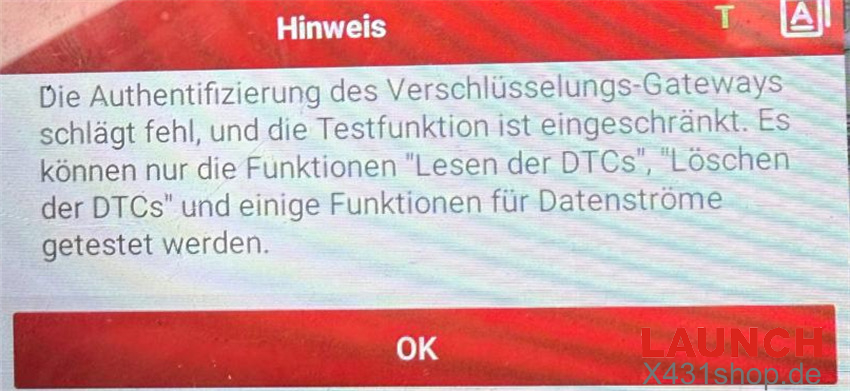
- “Encryption gateway authentication failed; testing functionality is restricted.”
- “Function not activated. Error Code: 1000699.”
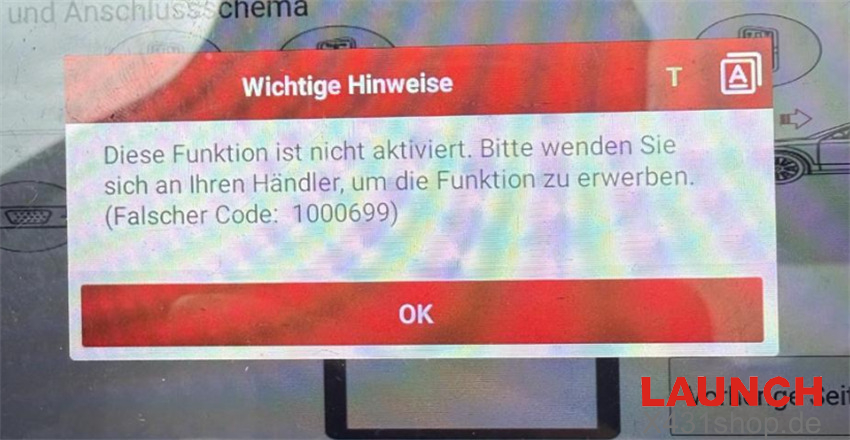
These notifications usually indicate that the scanner has not been granted access to the vehicle’s Security Gateway (SGW) system.
Understanding the Cause
Many Mercedes-Benz models equipped with modern cybersecurity systems restrict access to certain diagnostic features through an encrypted Security Gateway.
Without SGW authorization, you can generally perform only basic diagnostics, such as:
- Reading fault codes
- Erasing fault codes
- Viewing limited live data
However, functions such as:
- Special service procedures
- ECU coding
- Adaptations
- Advanced diagnostics
may remain inaccessible until gateway authentication is enabled.
How to Enable Full Access
To unlock protected Mercedes-Benz functions, you must activate the European SGW Function License on your Launch CRP919E BT.
Activation Path
Mall → Other Goods → Other Software Packages
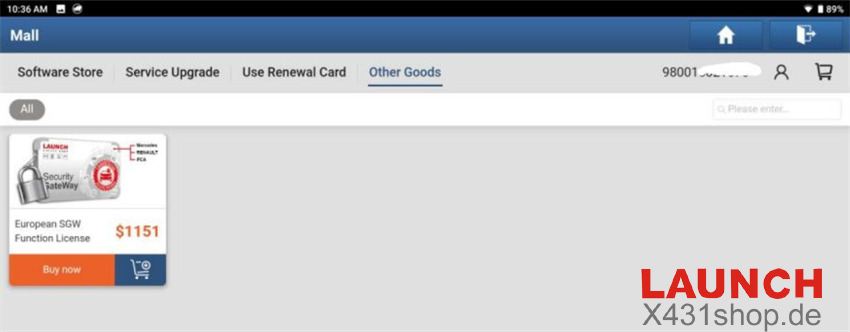
Once activated, compatible Mercedes-Benz vehicles can be accessed through the authenticated gateway, restoring advanced diagnostic functionality.
What Does the European SGW Package Include?
The license bundle contains:
- Mercedes-Benz Gateway Authorization (1-Year Access)
- FCA & Maserati Gateway Authorization (1-Year Access)
- Renault & Dacia Secure Gateway Access (20 Connections)
Note: Subscription renewal is required after the license expires.