



If you are using the Launch X431 PRO3S+ SMARTLINK HD and suddenly receive a login or account warning—
“The serial number is not detected by the account.you are currently logged in, Please confirm the device is activated or log in with another account.”
Like the following pic error:
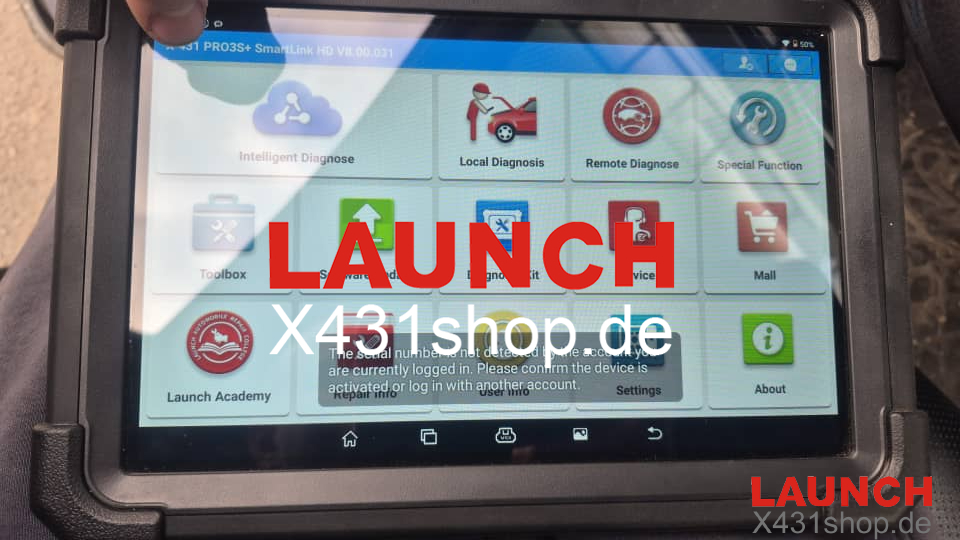
To resolve the issue, follow these steps carefully:
1. Verify the APK File
Make sure the APK file installed on your Launch X431 device is official, complete, and not corrupted.
2. Check Account Login Status
Confirm that your Launch account is fully enabled for login and properly linked to the device serial number.
3. Update All Software
Ensure that:
- The system firmware
- The Launch diagnostic application
- All vehicle software packages
are updated to the latest version.
4. Restart the Device
After completing updates, restart the device to allow all changes to take effect.
5. If all still not working, send us your activation paper, SN, account name, we will send you new to login to try.
Why Choose Launch X431 PRO3S+ SMARTLINK HD?
The Launch X431 PRO3S+ SMARTLINK HD is a powerful professional diagnostic tool offering:
- Full system diagnostics for passenger cars & heavy-duty vehicles
- DOIP, CAN FD, J2534 support
- Advanced functions: ECU coding, online programming, bi-directional control
- Remote diagnostics with SMARTLINK HD
- It is widely used by professional mechanics, workshops, and diagnostic specialists worldwide.